Shopify metaobject pages: what they are, and 9 ways stores use them
Shopify metaobject pages give every designer, store or recipe its own URL from one template. How they work, 9 ways to use them and the limits to know.
TL;DR: A Shopify metaobject page is a page Shopify builds for every entry of a content type you set up yourself, such as a designer, a store or a recipe. You design one template in the theme editor. After that, every new entry gets its own URL (for example /pages/designers/jane-doe) without extra code. Stores use them for designer pages, store pages, brand pages, ingredient pages, recipes, ambassador profiles, maker stories, FAQ articles and event pages.
What is a Shopify metaobject page?
Shopify has a fixed set of content types: products, collections, pages and blog posts. A metaobject is a content type you define yourself. For example "Designer", with a name, portrait, bio and a list of products. Or "Store", with an address, opening hours and a photo. In Dutch they're called metaobjecten.
A metafield adds one extra field to something that already exists, like a care label on a product. A metaobject stands on its own. It has its own fields, and you can use it anywhere in the store.
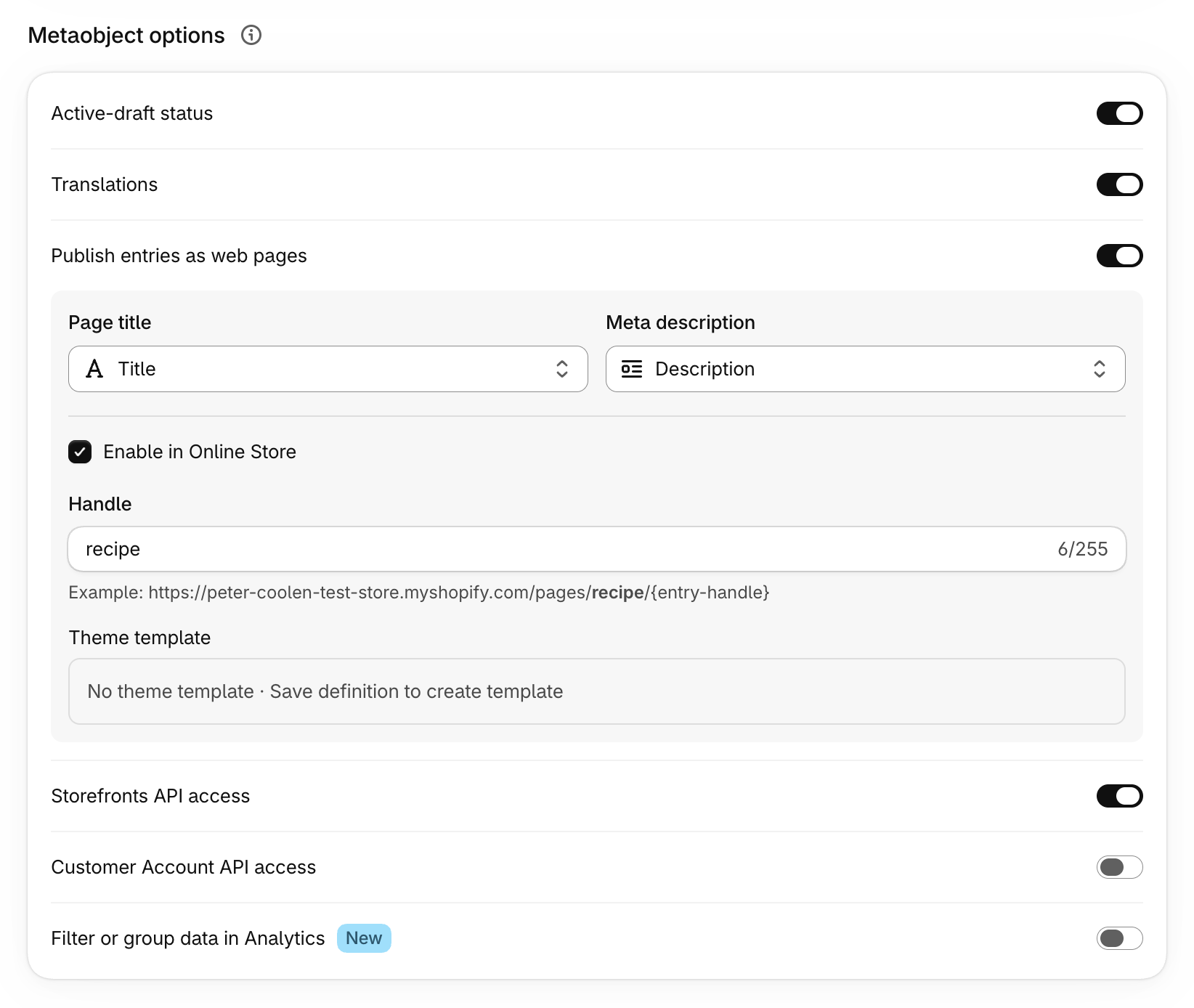
Since August 2023, an entry can also become a page (Shopify.dev changelog). You switch on "Publish entries as web pages" on the definition and build one template. Each entry then gets its own page at /pages/{type}/{entry}. Add a fortieth designer in the admin, and the fortieth designer page is live.
A developer sets up the fields and the template once. After that, the team only fills in a form for each new page. Every page uses the same layout, so pages look the same without anyone checking.
How a metaobject page works
Four parts, in this order:
- Definition. In Settings → Metafields and metaobjects, name the type and add fields. Turn on Storefront access and Publish entries as web pages. Choose which fields fill the page title and meta description, and set the URL handle. Behind the scenes this turns on two settings:
renderableadds SEO fields and puts the entries insitemap.xml, andonlineStoregives each entry a template and a URL (Shopify.dev). - Entries. In Content → Metaobjects, add one entry per designer, store or recipe. An entry is either Draft or Active.
- Template. In the theme editor, open the page selector and choose Create metaobject template. Shopify saves it as
templates/metaobject/{type}.json. The template starts empty. You add sections and connect them to your fields with dynamic sources (Shopify Help Center). - Overview page. Shopify doesn't make the overview for you. You create a normal page with its own template that lists all entries.
Page, blog post or metaobject page?
| Shopify page | Blog post | Metaobject page | |
|---|---|---|---|
| Content | One rich text field | Title, body, tags, author | Your own fields: text, images, numbers, product lists |
| Layout | Per page or per template | Per blog template | One template for every entry |
| Sort or filter an overview | No | By tag | By any field |
| Link to products | By hand in the text | By hand in the text | Product reference field |
| URL | /pages/{handle} | /blogs/{blog}/{handle} | /pages/{type}/{handle} |
| Best for | About, shipping, one-off pages | News and stories | Many pages with the same structure |
9 ways stores use metaobject pages
1. Designer and artist pages
Inusual, a Brazilian furniture store, runs its designer pages on metaobjects at /pages/designer/{name}. The overview shows 21 designers in two groups: contemporary designers and design icons such as Hans Wegner and Marco Zanuso. You can filter by category, and each designer card shows how many of their pieces the store sells. Each designer page lists their products. The designers also appear with portraits in the main menu.
2. Store and stockist pages
Physical shops fit this well: one page per shop with address, opening hours, photo and map, at /pages/stores/{city}. In a Shopify Community thread, a merchant's outlet page had the short code SFPO as its handle instead of the full store name. Links built from the name broke. That's why you link with the URL Shopify gives you (system.url) instead of guessing the handle. Each store page can also carry its own LocalBusiness structured data, which helps it show up for searches like "[brand] Utrecht".
3. Brand pages for multi-brand shops
A shop that sells many labels needs a page per brand: logo, story, country of origin and the products from that label. A Brand metaobject gives every brand the same layout. A product reference field links each product to its brand, so the brand page fills itself.
4. Ingredient and material pages
Beauty, food and supplement brands create an Ingredient type once and link it to every product that contains it. With web pages on, "niacinamide" or "merino wool" gets its own URL. That page answers a question people search for, and it links straight to the products.
5. Recipes
Food brands often put recipes in blog posts. As a metaobject, a recipe has real fields: prep time, servings, ingredients, method and the products used. So you can build an overview people filter by "under 30 minutes". A blog can't do that. Each product page can also show "used in these recipes" from the same data.
6. Ambassador, athlete and team profiles
Shopify's own help page uses ambassadors as its example: one page per ambassador with a bio, social links and images. The same works for athletes, stylists or the team behind a brand.
7. Farm, maker and origin stories
Grocers and craft brands give each farm, workshop or producer its own page. "Where does this come from?" is then no longer one line in a product description. It's a page the customer opens from the product.
8. FAQ and help articles
In the same Shopify Community thread, a merchant built FAQ articles as metaobject pages and then needed an overview to list them. Help articles with a question, an answer and related products all have the same structure, so they fit well. Check first how your theme search handles them (see the limits below).
9. Events and workshops
Shops that run tastings, workshops or pop-ups can give each event a page with date, location, description and the products involved. Because date is a real field, the overview can show upcoming events first.
Headless stores too
Metaobject pages also work if your site runs outside a Shopify theme. Through the Storefront API (the way an external front end reads Shopify data), each entry has an onlineStoreUrl and a seo field (Shopify.dev). A Next.js or Hydrogen site can show the same entries on its own URLs. For a Hydrogen store, Shopify says to switch off Enable in Online Store.
Thinking about turning your designers, stores or recipes into pages? Send me what you have now. I'll tell you whether metaobject pages fit or whether you need more. Get in touch.
Build an overview page that updates itself
The overview is the one part you build yourself. Hardcoded links break as soon as someone renames an entry. A loop doesn't. This is a section for a designer type with name and portrait fields:
{%- comment -%} sections/designer-index.liquid {%- endcomment -%}
{%- paginate shop.metaobjects.designer.values by 24 -%}
  <ul class="designer-index" role="list">
    {%- for designer in shop.metaobjects.designer.values -%}
      <li>
        <a href="{{ designer.system.url }}">
          {%- if designer.portrait.value -%}
            {{ designer.portrait.value
              | image_url: width: 600
              | image_tag: loading: 'lazy',
                alt: designer.name.value,
                widths: '300, 600' }}
          {%- endif -%}
          <span>{{ designer.name.value }}</span>
        </a>
      </li>
    {%- endfor -%}
  </ul>
  {{- paginate | default_pagination -}}
{%- endpaginate -%}
What this does:
system.urlgives each entry's real URL, so a renamed handle never breaks a link.- A loop shows at most 50 entries unless you paginate, so
paginatekeeps long lists complete. - Images load only when they scroll into view, at a size that fits.
- Every image gets the designer's name as alt text, and plain
<a>links work with a keyboard.
The Shopify Partners blog explains the same method.
On the entry template, a few lines of structured data tell search engines and AI tools who the page is about:
<script type="application/ld+json">
  {
    "@context": "https://schema.org",
    "@type": "Person",
    "name": {{ metaobject.name.value | json }},
    "url": {{ request.origin | append: metaobject.system.url | json }}
  }
</script>
Use LocalBusiness for stores and Recipe for recipes. The data is already in your fields, so this is quick to add.
Limits to know before you build
- The
/pages/part of the URL is fixed. You choose the type handle and the entry handle, not that prefix. - The template starts empty. It's a JSON template, so you need an Online Store 2.0 theme.
- No automatic overview page. Build one, and paginate once you have more than 50 entries.
- Theme search may skip them. A report on Shopify's developer forum says metaobject pages don't show up in the store's search or predictive search, even though they're in the sitemap. Test it on your theme before you move help articles over.
- Draft entries don't get a page. Check that every entry is Active before launch.
- Set the SEO fields. For each definition, choose which fields fill the page title and meta description.
- Translate every entry. A Dutch store that also sells in Belgium and Germany needs Dutch, French and German versions of each entry, not only of the template.
- Moving a blog over? Add 301 redirects from the old article URLs to the new pages.
- The number of entries isn't a problem. Since October 2025 a definition can hold up to 1,000,000 entries (Shopify.dev changelog).
Shopify keeps adding features. Its changelog now lists creating and editing metaobjects in the theme editor, and using metaobject fields in Analytics reports.
Metaobject pages or a headless CMS?
They solve different problems. Metaobject pages work well when every page has the same structure (a designer is always a name, a portrait, a bio and products) and the store runs on a Shopify theme.
They're not enough when marketing wants to build campaign pages from free blocks, when content differs per market, or when the same content has to appear outside Shopify. Then I add a CMS. On The Laundry Story, DatoCMS handles the content and Shopify handles products, stock and checkout. On Orangefit, which I built with my colleagues at Superhero Cheesecake, the content team publishes pages in several languages on a headless Shopify store.
I compare the options in Best Headless CMS for Shopify: DatoCMS vs Sanity, or Are Metaobjects Enough?, and the bigger choice in Shopify Headless vs Native Shopify.
FAQ
What is a metaobject page in Shopify?
It's a page Shopify builds for each entry of a content type you define yourself, using one shared template. You turn it on with "Publish entries as web pages" on the metaobject definition, then design the template in the theme editor.
What URL does a metaobject page get?
/pages/{type-handle}/{entry-handle}, for example /pages/stores/amsterdam. You can change both handles, but the /pages/ part stays.
Do metaobject pages get indexed by Google?
They can. With web pages switched on, entries get SEO fields and are added to your sitemap. Choose a title and description field for every definition and check /sitemap.xml after launch.
How many metaobject pages can I create?
Up to 1,000,000 entries per definition, a limit Shopify raised in October 2025. For most stores, the real limit is how many good pages the team can write.
Can I use metaobject pages with a headless Shopify store?
Yes. The Storefront API returns each entry's fields, SEO data and online store URL, so your Next.js or Hydrogen site can show them on its own URLs.
What's the difference between a metafield and a metaobject?
A metafield adds one value to something that already exists, like a care label on a product. A metaobject is a content type of its own with several fields. You can reuse it across products, collections and pages, and publish it as its own page.
Start with one content type
Pick the content your team now copies by hand: stores, designers, recipes or ingredients. Turn it into one metaobject type with a template and an overview page, and see how much faster the next ten pages go.
Want help choosing the right fields and building templates your team can run on their own? I build Shopify stores, native and headless. Tell me about your store or see my e-commerce services.
Sources
- Shopify Help Center: Building web pages with metaobjects
- Shopify.dev changelog: Renderable and Online Store capabilities for metaobjects (14 Aug 2023)
- Shopify Partners blog: How to Create an Index List for Metaobject Pages
- Shopify.dev: Metaobject theme templates
- Shopify.dev: Use metaobject capabilities
- Shopify.dev: Metaobject limits
- Shopify.dev: Storefront API Metaobject object
- Shopify.dev changelog: Increased limits in metafield and metaobject definitions (24 Oct 2025)
- Shopify.dev changelog: Metaobject pages now available in storefront menus
- Shopify changelog (create and edit resources in the theme editor; metaobject fields in Analytics reports)
- Inusual designers index
- Shopify Community: accessing the URL handle of metaobject web pages
- Shopify Developer Community: metaobject pages not showing in search
- JadePuma podcast ep. 184: Metaobject Pages